leaflet-rotate


A Leaflet plugin that allows to add rotation functionality to map tiles
For a working example see the following demo
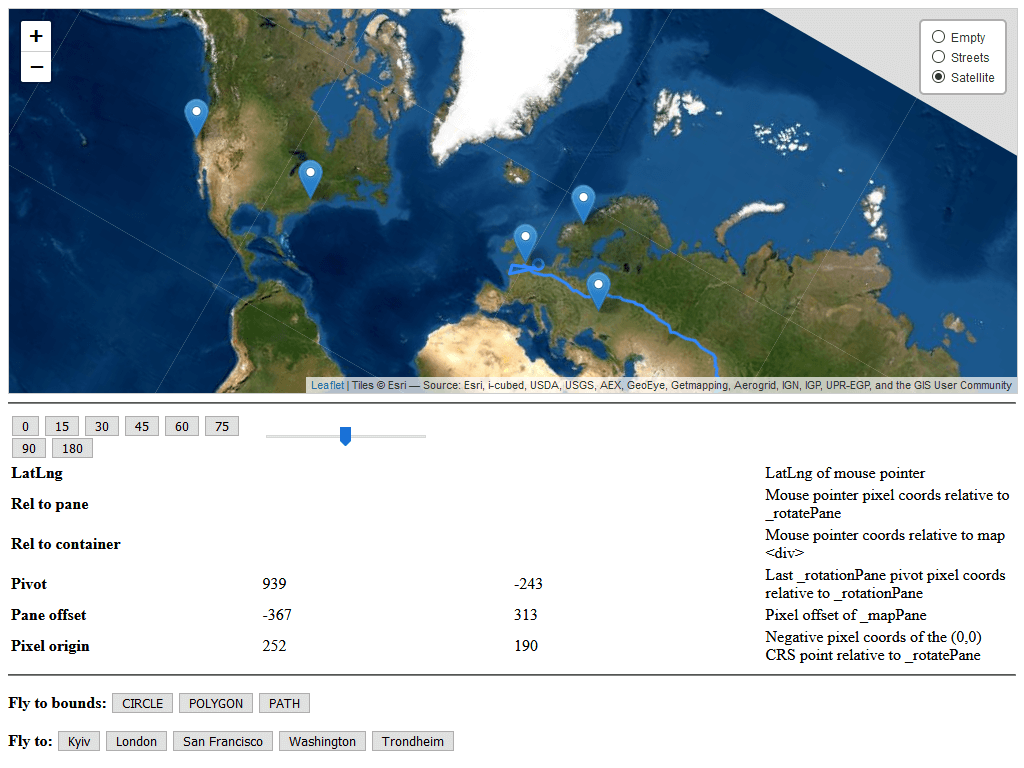
Initially based on the work of Iván Sánchez Ortega (see: #268)
How to use
Load Leaflet first, then the plugin. For example, using the published CDN build:
<link rel="stylesheet" href="https://unpkg.com/leaflet@1.9/dist/leaflet.css">
<script src="https://unpkg.com/leaflet@1.9/dist/leaflet.js"></script>
<script src="https://unpkg.com/leaflet-rotate@0.5.3/dist/leaflet-rotate.js"></script>
Or if you want to test it with 2.0.0-alpha.1:
<link rel="stylesheet" href="https://unpkg.com/leaflet@2.0.0-alpha.1/dist/leaflet.css">
<script src="https://unpkg.com/leaflet@2.0.0-alpha.1/dist/leaflet-global-src.js"></script>
<script>globalThis.L = globalThis.leaflet;</script>
<script src="https://unpkg.com/leaflet-rotate@0.5.3/dist/leaflet-rotate.js"></script>
Now, you can enable rotation in the map options. Bearing and pitch values are in degrees:
const map = L.map('map', {
    rotate: true,
    bearing: 30,
    pitch: 20,
    rotateControl: true,
});

map.setBearing(90);
map.setPitch(35);
console.log(map.getBearing(), map.getPitch());
Map options
| Option | Default | Description |
|---|---|---|
rotate |
false |
Enables map rotation and pitch. |
bearing |
0 |
Initial map bearing, in degrees. |
pitch |
0 |
Initial map pitch, in degrees (clamped to 0–85). |
pitchMaxDistance |
3 |
Far plane for pitched maps, in multiples of the map height: farther areas (and anything beyond the horizon) are not loaded and are covered by the .leaflet-pitch-sky element. Lower values load fewer tiles. |
rotateControl |
true |
Adds the rotation control. Set to false to hide it, or pass options such as { closeOnZeroBearing: false }. |
shiftKeyRotate |
true |
Enables bearing changes with Shift + mouse wheel. |
pitchDrag |
true |
Enables bearing and pitch changes with Ctrl + mouse drag or right-button drag. |
touchRotate |
false |
Enables rotation with a two-finger touch gesture. |
touchPitch |
false |
Enables pitch changes by dragging two fingers vertically. |
compassBearing |
false |
Makes the bearing follow the device compass. On iOS, enable it from a user gesture (e.g. map.compassBearing.enable() in a button click) so that the orientation permission can be requested. |
Map methods and events
| API | Description |
|---|---|
map.setBearing(degrees, options?) |
Sets the bearing. Use { animate: true, duration: 0.5 } for an animated change; duration is in seconds. |
map.getBearing() |
Returns the current bearing in degrees. |
map.setPitch(degrees, options?) |
Sets the pitch, clamped to 0–85 degrees. Accepts the same animation options as setBearing. |
map.getPitch() |
Returns the current pitch in degrees. |
map.resetNorth(options?) |
Animates the bearing back to 0 (pass { animate: false } to skip the animation). |
map.resetNorthPitch(options?) |
Animates both bearing and pitch back to 0. |
rotate event |
Fired when the bearing changes. |
pitch event |
Fired when the pitch changes. |
Rotation control
The control is available as L.Control.Rotate or L.control.rotate(options). Click it to reset bearing and pitch (map.resetNorthPitch()), drag it horizontally to rotate and vertically to change the pitch. The map option rotateControl adds it automatically.
| Option | Default | Description |
|---|---|---|
position |
'topleft' |
Leaflet control position. |
closeOnZeroBearing |
true |
Hides the control when both bearing and pitch are zero. |
visualizePitch |
true |
Tilts the icon with the pitch; when false, clicking only resets the bearing and dragging only rotates. |
Marker options
| Option / method | Description |
|---|---|
rotation |
Marker icon rotation in radians. |
rotateWithView |
Rotates the icon with the map bearing. |
keepUpright |
With rotateWithView: true, flips the icon as needed to keep it readable while preserving line alignment. |
scale |
Optional scale applied to the marker icon. |
marker.setRotation(radians) |
Updates the marker’s icon rotation. |
Build Guide
Within your local development environment:
git clone git@github.com:Raruto/leaflet-rotate.git
cd ./leaflet-rotate

npm i         # install dependencies
npm run dev   # start dev server at: http://localhost:8080
npm run build # generate "dist" files (once)
npm run test  # build and run browser tests
After that you can start developing inside the src and test folders (eg. open “http://localhost:8080/test” in your browser to preview changes).
Side notes:
Be aware that this library overrides notable parts of leaflet core via the L.Class.include() function in order to make the rotate feature usable as a standalone plug-in.
Initial changes to this project have been apported by comparing the following branches: https://github.com/Leaflet/Leaflet/compare/main…fnicollet:rotate-master (ref: bac6c7d)
Compatibile with:


Contributors: IvanSanchez, Fnicollet, Hyperknot, Raruto